AI features
Set up the AI models, then use AI search and auto-tagging. Everything runs on your computer.
AI search, auto-tagging, duplicate finding and quality scores all run on your own computer using small AI models. Your images are never uploaded. Download each model once; after that they work offline.
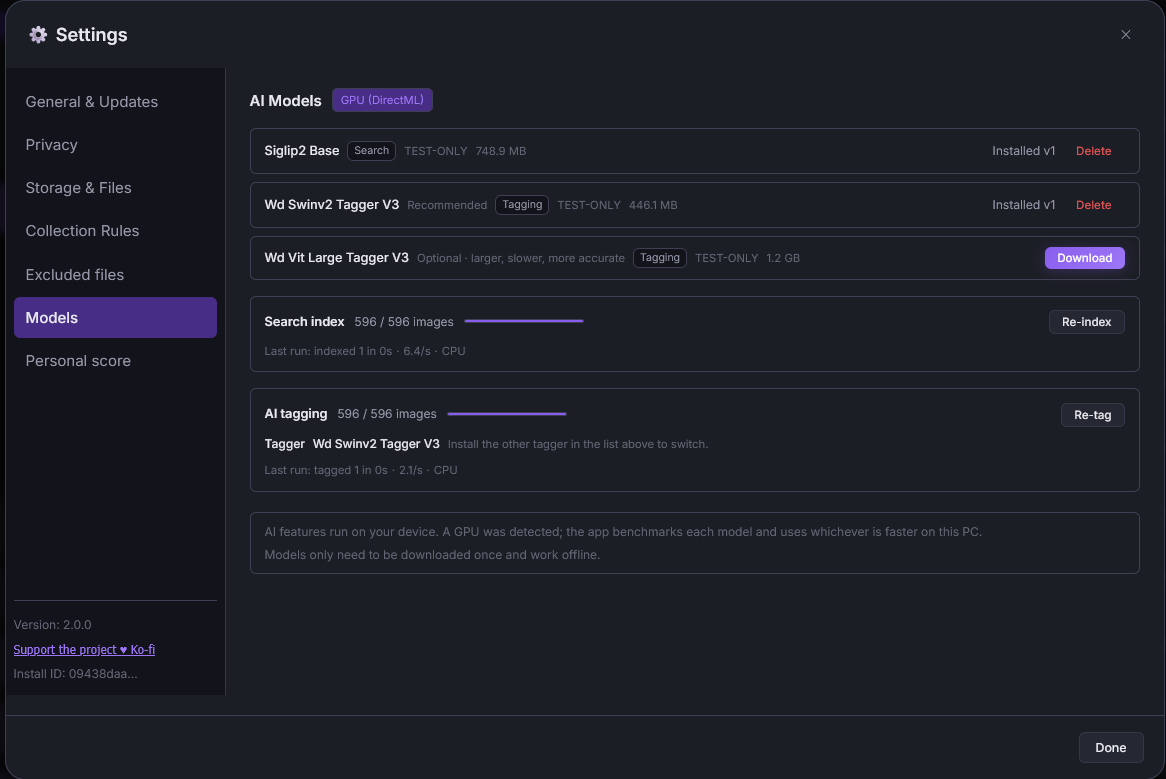
Set up the models
- Open Settings → Models.
- Click Download next to the models you want:
| Model | Used for | Download |
|---|---|---|
| SigLIP 2 Base | AI search, Find similar, Duplicates | about 785 MB |
| WD SwinV2 Tagger v3 (recommended) | Auto-tagging | about 470 MB |
| WD ViT-Large Tagger v3 (optional) | Auto-tagging: slower, more accurate | about 1.26 GB |
- Once installed, the app processes your library in the background. You'll see progress under Search index and AI tagging, and it carries on where it left off if you close the app.
The Models page tells you whether AI runs on your GPU (DirectML) or CPU only. On a typical CPU, indexing for search does roughly 8 images a second and tagging 1–2 a second, so a big library's first pass can take a while. A dedicated graphics card is much faster.
AI search
Click ✦ AI in the search box, then describe what you're looking for in plain words, such as a red fox in the snow at sunset or close-up portrait, soft lighting. Results are sorted by how well they match.
To find images like one you already have, right-click it and choose Find similar. Images the search index hasn't reached yet won't appear in AI results until it catches up.
Auto-tagging
With a tagger installed, each image gets AI tags describing what's in it (characters, objects, styles). They appear in the detail panel under ✦ AI tags, with a confidence percentage.
- Click an AI tag to filter the library by it.
- Click + to turn it into one of your own tags.
- Use Re-tag in Settings → Models to run the tagger again.
AI tags are kept separate from your own tags, so the AI never changes tags you've added.
If you've installed both taggers, pick which one to use under Tagger on the AI tagging card. Switching re-tags your library in the background with the new model; your own tags aren't affected.